
Revit MEP Families: Smart Connectors & System Intelligence
Stop fighting disconnected fittings, broken connectors, and wrong schedules. Build MEP families that connect cleanly, calculate correctly, and stay schedule-safe—built for real production teams.
Turn MEP Families Into a Reliable System.
By the End of This Course, You’ll Be Able To: ✅ Future-Proof Content: Develop a parametric-first mindset to build MEP families that adapt without breaking. ✅ Data-Driven Documentation: Align parameters so schedules populate correctly and stay consistent with office standards. ✅ System-Ready Connections: Build connector-driven content that connects cleanly, sizes correctly, and supports system behavior. ✅ Error-Resistant Performance: Avoid common connector, formula, and nesting pitfalls that cause broken fittings and wrong schedules.
$499.00
Master a Repeatable Revit Family Creation Workflow
✓ Phase 1: The Setup (Why it Matters) Set the right category, reference planes, origins, and parameter strategy so families stay stable and scalable. ✓ Phase 2: The Build (How it Behaves) Model with clean constraints, formulas, visibility control, and (when needed) nested components—so families flex predictably without breaking. ✓ Phase 3: The Output (What you Deliver) Produce tag/schedule-ready families with consistent types, shared parameters, materials, and view- based graphics that stay reliable across views and sheets.
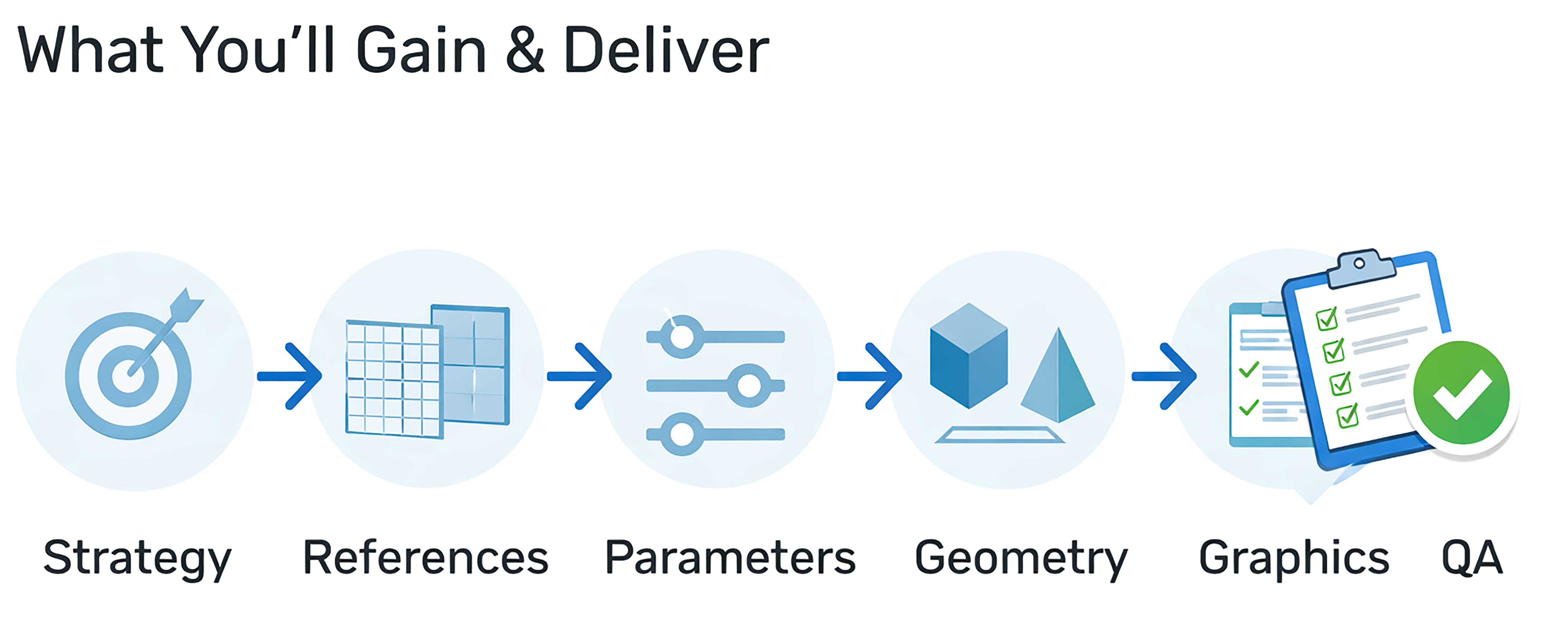
What You’ll Build: A Repeatable Revit Family Creation Workflow
You’ll stop guessing, fixing, and rebuilding families—and start creating stable, predictable, library-ready BIM content that performs reliably in real, coordinated projects. This course gives you a proven system to: • Build families that resize safely and behave predictably • Schedule and tag correctly—every time • Display cleanly in all views and detail levels • Follow one consistent standard your team can reuse No fragile families. No trial-and-error. Just a reliable workflow you can reuse on any project—every time.

Designed for MEP teams (and CAD-to-BIM transitions) who need reliable, calculation-ready Revit MEP families.
Does this sound like your Revit MEP family workflow? 1.- Families break when you change types/sizes—or connectors disconnect 2.- Flow/pressure/voltage data won’t populate, and schedules don’t match the model 3.- Pipe/duct systems offset, flip, or “ghost” when you connect components 4.- Calculations fail (system warnings, sizing errors, inconsistent results across views) 5.- Your library grows fast—but behavior, connectors, and data quality stay inconsistent Build System-Ready Revit MEP Families for Connectors, Schedules & Calculations.
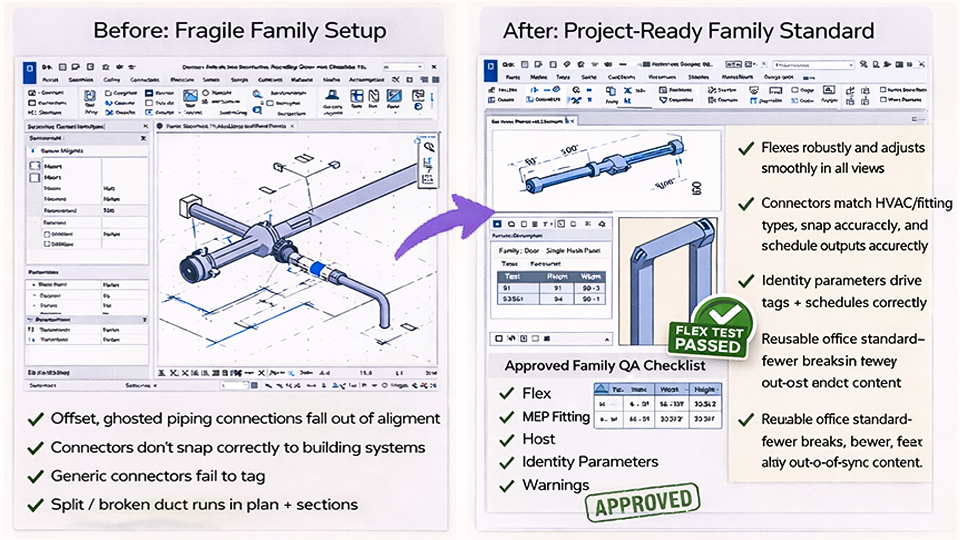
Stop Rebuilding MEP Families. Start Trusting Your System.
This is what happens when MEP families are built with a validated workflow—accurate connectors, clean schedules, and predictable system behavior on every project. You’ll build flex-tested, QA-approved content that snaps correctly, aligns cleanly, and uses identity parameters so tags and schedules populate reliably—reducing breaks, rework, and out-of-sync results across views.
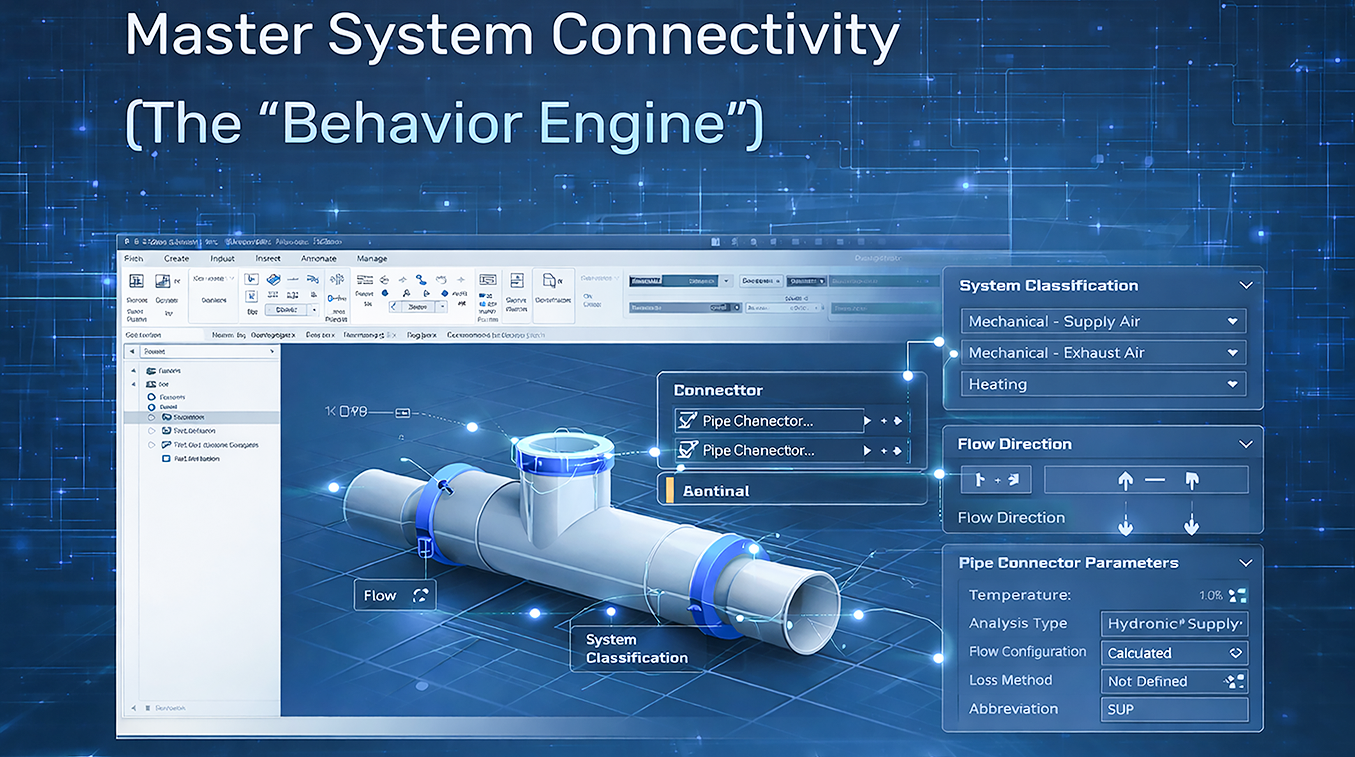
Master System Connectivity
Cease placing families that look right but don’t connect or calculate. Learn connector logic, system classification, and flow settings so your MEP families behave correctly in real projects.
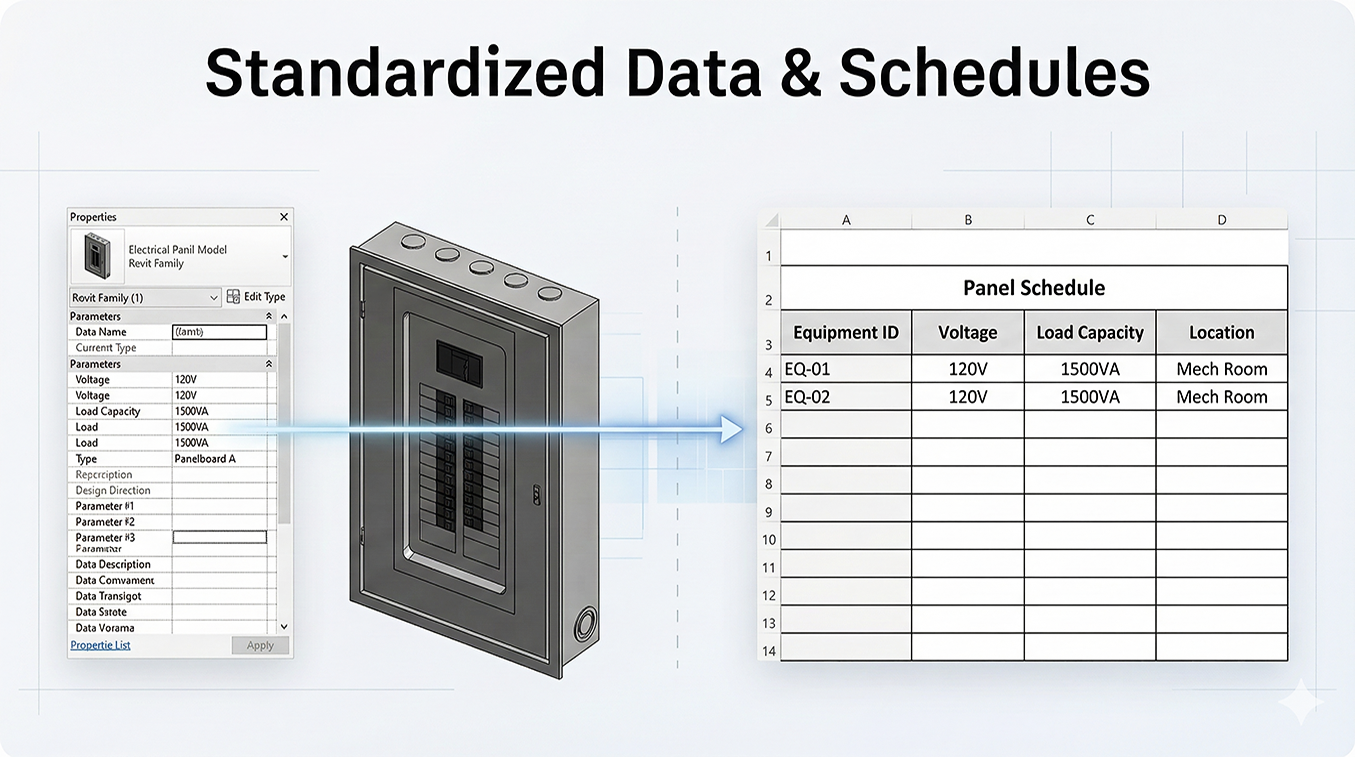
Standardized Data & Schedules
No more empty schedules and manual data entry. Build parameters and types that push real engineering data into tags, BOMs, and panel schedules—reliably and consistently.
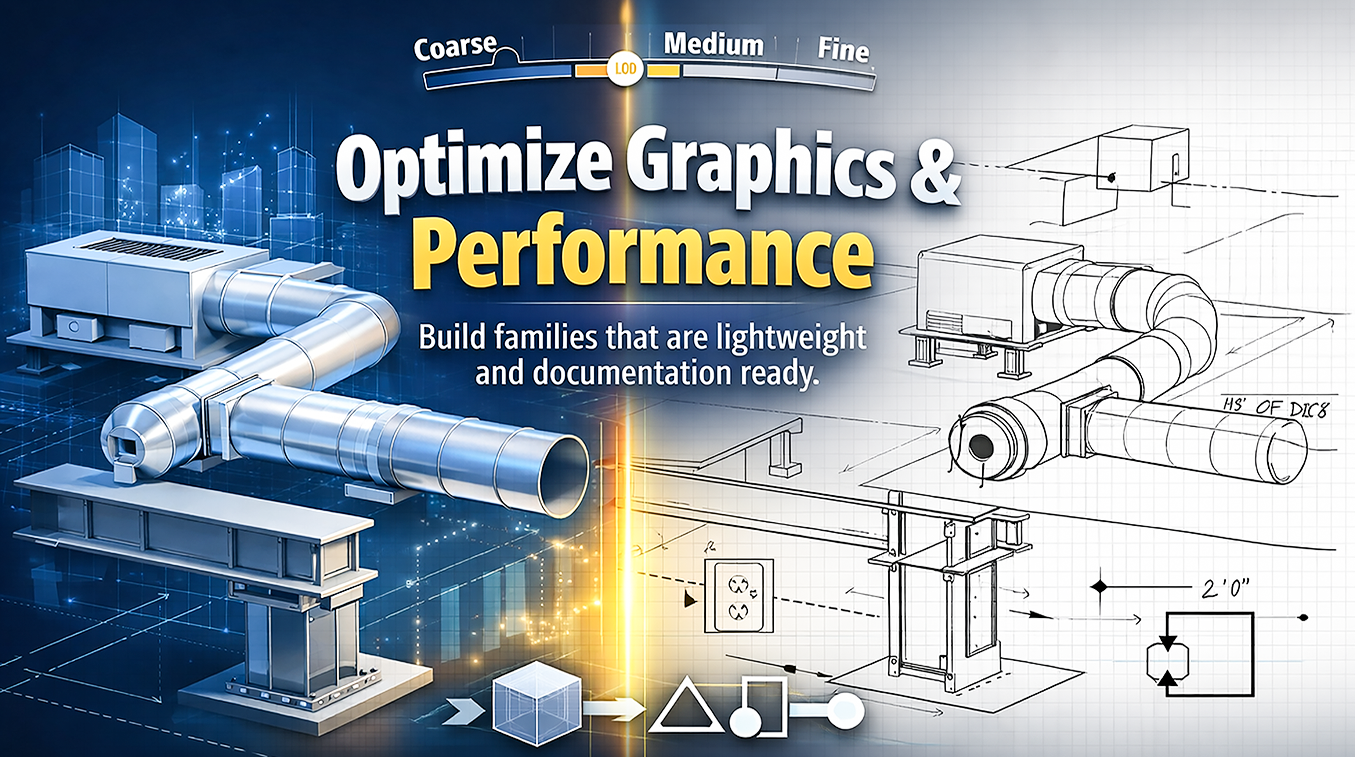
Model Performance with Clean Graphics
Break the bloated families and messy symbols circle. Build lightweight, documentation-ready MEP content with clear LOD control—3D for coordination, 2D for sheets, without performance hits.
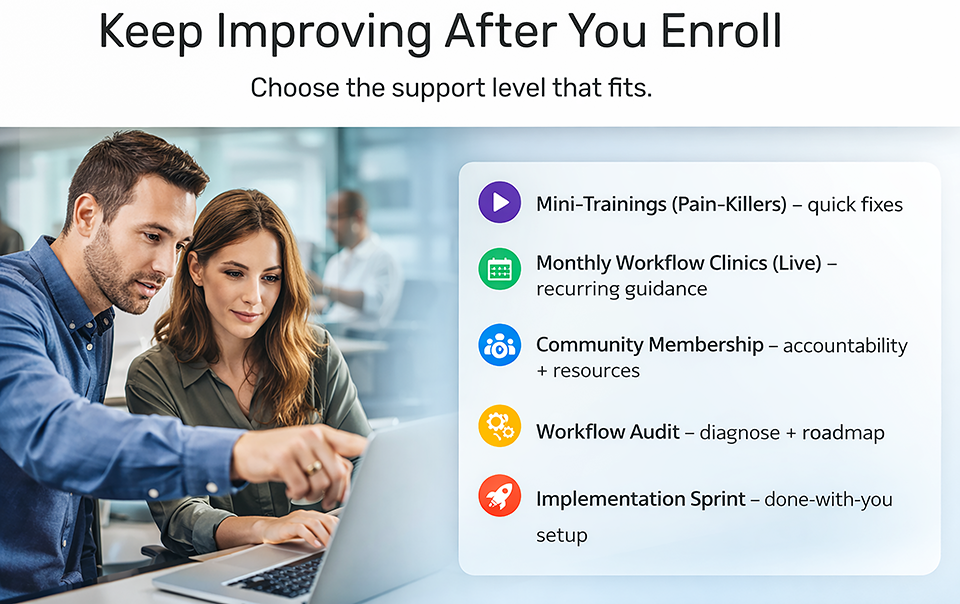
Support, when it matters.
You’re not on your own—choose the level of support you need to keep projects moving. Turn real project problems into repeatable workflows, with guidance when you need it. Coming soon!
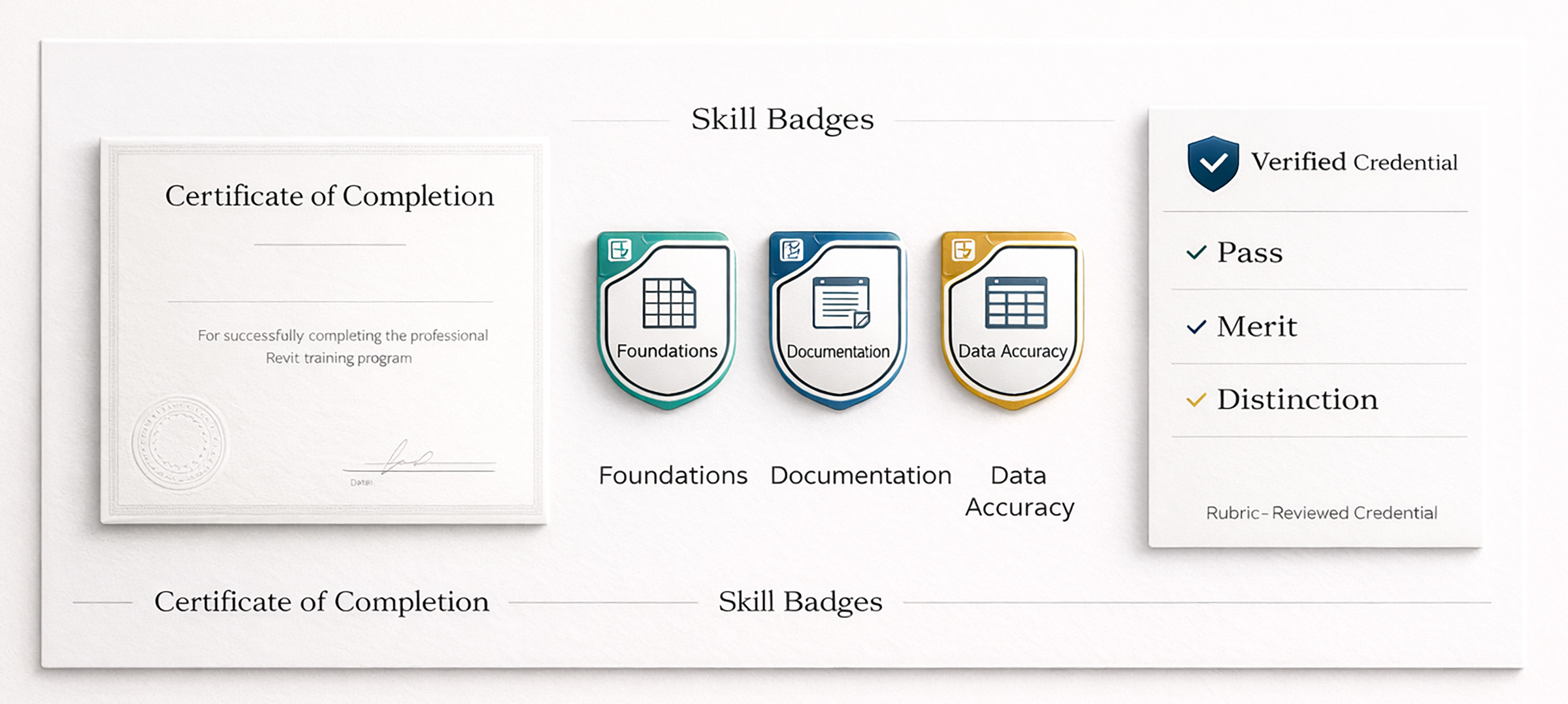
Revit Family Creation Credentials: Certificate, Skill Badges & Verified Credential
Included with enrollment: • Certificate of Completion • Shareable Skill Badges (earned when you submit the course capstone deliverable bundle) Optional Career Credential (Rubric-Reviewed): After you submit your capstone, you can request a Credential Review. You’ll complete a short Professional Readiness Upgrade on the same capstone (not a second project). Earn a Skills Verification Credential rated Pass / Merit / Distinction. Issued by Revit Strategies Academy (not an Autodesk certification). Credential Review availability: Credential Reviews are offered within monthly review capacity.

The Strategy Layer
✓ Workflow Decision Framework: The exact mental model for planning projects. ✓ Guided Practice Playbooks: Step-by-step PDF guides to build muscle memory. ✓ Validation Gates: Proof that your skills hold up under deadline pressure.

The Resource Vault
✓ Download Library: exercise files, checklists, and quick-reference PDFs ✓ Templates + Examples: starter view standards, sheet samples, schedule examples ✓ Resource Updates: new downloads added as the academy grows

The Support Network
✓ Learner Support: Q&A updates, clarifications, and resource guidance ✓ Community Access: connect with peers (if live) / coming soon (if not) ✓ Credentials Included: certificate + shareable skill badges
Master Revit MEP Family Creation for a Connected, System-Ready Workflow
Stop fighting disconnected families, unreliable connectors, and schedules that don’t populate correctly. Build connector-driven, system-aware Revit MEP families that size correctly, coordinate cleanly, and hold up under real project pressure. Full course access includes Certificate of Completion, Skill Badges, and future course updates. Try Module 1 risk-free. If this workflow isn’t the right fit, email us within 7 days (and under 20% completion) for a full refund.
$499.00

Learn from an Autodesk Certified Instructor & BIM Strategist
I’ve spent 25+ years in the AEC industry, and one pattern shows up in every firm: Revit family problems are rarely geometry issues — they’re workflow, standards, and data logic issues. I’m Roger Mujica, an Autodesk Certified Instructor (Silver) and BIM Strategist. I don’t just teach how to build families — I help professionals create production-ready Revit content with clean parameters, predictable behavior, and built-in validation, so schedules stay accurate, tags work correctly, and families scale across real projects without rework. You’ll learn the same structure professionals use to deliver under real deadlines—without rework. • Workflow-first project setup (levels, grids, coordinates, CAD links) • Documentation standards (views, sheets, schedules) • Real deliverables (not demos)
Proof from Real Revit MEP Family Workflows
See how engineers eliminated broken connectors, failed calculations, and schedule mismatches—by building system-aware, production-ready MEP families.
Disconnect warnings and bad system calculations were killing our deadlines. After this course, our HVAC + piping families use correct connectors and sizing logic—schedules finally match reality.
San Diego, CA
Our library looked ‘complete’ but failed under engineering use. The course gave us a rebuild method for load/flow-driven families—now our content is stable, consistent, and reusable across projects.
Ottawa, Canada
No more disconnect warnings, broken systems, or manual overrides. Our Revit MEP families behave like real systems, and our teams trust the schedules again.
San Francisco, CA
This training showed me how to build families with parameters, formulas, and lookup tables that actually drive behavior. After Roger’s workflow, my content is flexible, predictable, and analysis-ready.
Washington, DC
Most training skips what matters: connectors, system behavior, and reliable calculations. Now I build families that support engineering decisions instead of breaking models during coordination.
Brussels, Belgium
MEP family creation became an engineering process—repeatable, accurate, and scalable. We standardize once, and our models stop falling apart during late-stage changes.
Las Vegas, NV
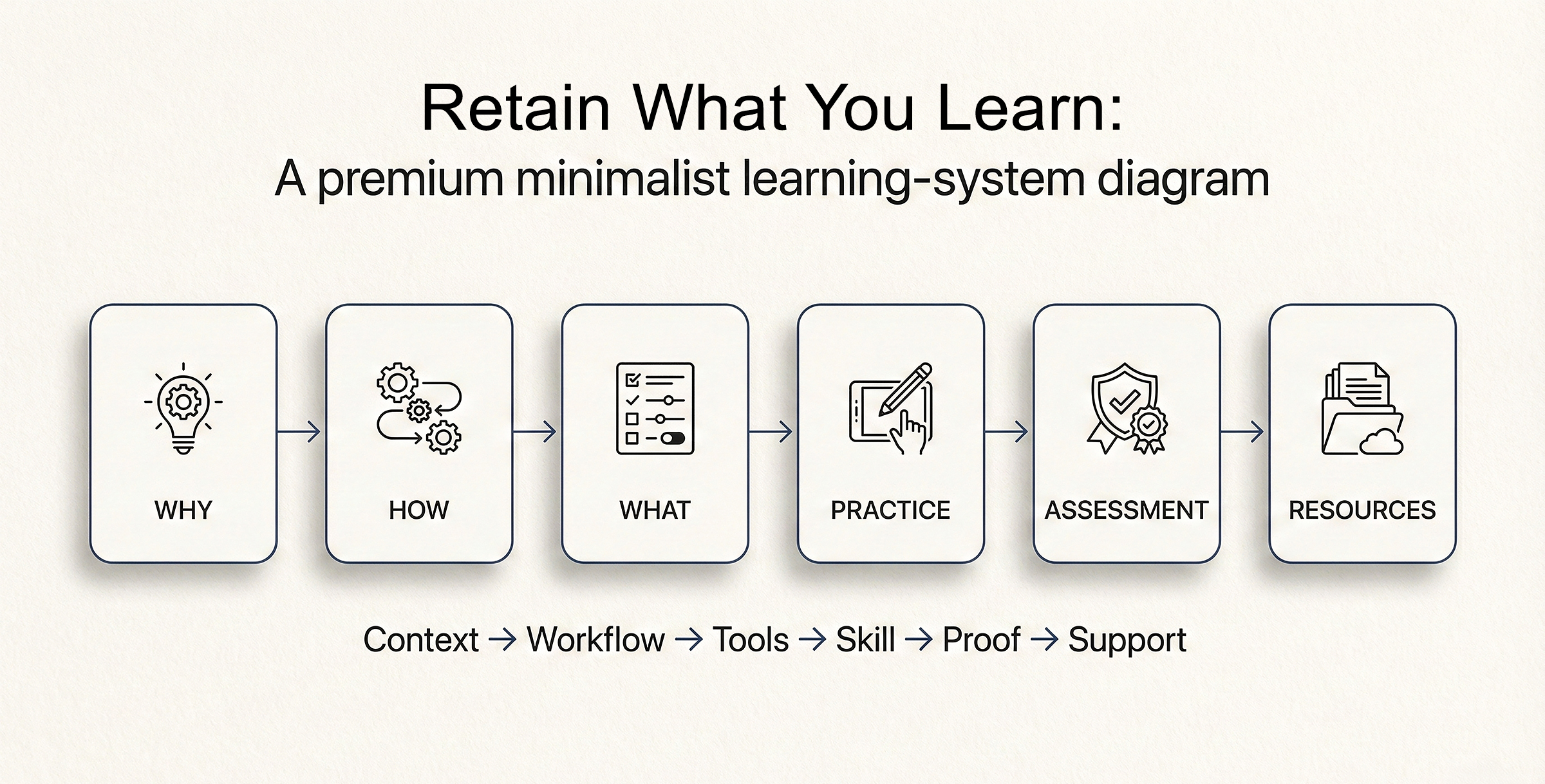
Revit Family Creation Workflow Training for Real Projects
Most courses overload you with “features” (the What) without context—so the knowledge doesn’t stick. This course uses a professional learning sequence built for real family creation delivery: ✓ Why: Strategy first—understand the problem we’re solving. ✓ How: Workflow in motion—see the sequence and how to build. ✓ What: Tools with context—settings only after the system is clear. ✓ Practice: Guided exercises that build repeatable skill. ✓ Assessment: Capstone checkpoints that prove competence. ✓ Resources: Templates and references to stay consistent on real projects. Not a tutorial library—a system for building professional Revit workflow capability.
Course Curriculum
-
-
(Included in full purchase)
Welcome: Course Roadmap & Outcomes (Video) — The “Why”
-
(Included in full purchase)
Workflow-First Learning: Build Skill Through Outcomes, Not Memorization (Reading) — The “Why”
-
(Included in full purchase)
Getting Started Checklist & Download Course Files (RVT/RFA/PDF) — The “How”
-
(Included in full purchase)
How to Use Thinkific (Navigation + Progress) (Video) — The “How”
-
(Included in full purchase)
Thinkific Quick Guide: Navigation + Progress
-
(Included in full purchase)
Course Files Explained (Pilot Project Concept) (Video) — The “What” | The “How”
-
(Included in full purchase)
Credentials & Proof of Skill: Certificate, Badges, and Career Credential (How You Earn Them) — The “What”
-
(Included in full purchase)
-
-
(Included in full purchase)
Module Overview: Goals + Roadmap
-
(Included in full purchase)
Why MEP Families Fail in Production - The “Why”
-
(Included in full purchase)
Family Strategy: System vs Loadable & The Editor Interface (Video) - The “What” - The “Why”
-
(Included in full purchase)
Family Categories, Hosting & Templates (Video) - The “How”
-
(Included in full purchase)
Family Environment Essentials: Reference Levels, Origin & Control Geometry - The “What”
-
(Included in full purchase)
Core Practice: Open, Inspect & Diagnose a Family - The “Practice”
-
(Included in full purchase)
Checkpoint: Family Editor Fundamentals Review - The “Assessment”
-
(Included in full purchase)
Templates & Standards: Naming, Categories & Best Practices - The “What”
-
(Included in full purchase)
Reading — Module 1 Standards Pack (Templates + Reference Controls) — The “Resource”
-
(Included in full purchase)
-
-
(Included in full purchase)
Module Overview: Goals + Roadmap
-
(Included in full purchase)
Why the Interface Changes: Category & Discipline Context — The “Why”
-
(Included in full purchase)
Mastering the Ribbon: Forms, Datum & Work Planes (Video) — The “How”
-
(Included in full purchase)
The Family Types Manager: The Brain of the Family (Video) — The “What”
-
(Included in full purchase)
Environment Essentials: Object Styles & Project Units — The “How”
-
(Included in full purchase)
Core Practice: Interface Scavenger Hunt & Setup — The “Practice”
-
(Included in full purchase)
Checkpoint: Family Editor Interface Proficiency — The “Assessment”
-
(Included in full purchase)
Reading — Comparison Map: Priority Tools by Discipline — The “Resource”
-
(Included in full purchase)
-
-
(Included in full purchase)
Module Overview: Goals + Roadmap
-
(Included in full purchase)
The Parametric Skeleton: Why Families Break Without It - The “Why”
-
(Included in full purchase)
Building the Skeleton: Reference Planes & Work Planes (Video) - The “How”
-
(Included in full purchase)
Constraints That Behave: Align/Lock, Dimensions, Equality & Safe Relationships (Video) - The “How”
-
(Included in full purchase)
Core Practice I: Build a Skeleton Framework for a Simple Component - The “Practice”
-
(Included in full purchase)
Flex Before You Model: The “Skeleton-First” Workflow (Video) - The “What”
-
(Included in full purchase)
Core Practice II: Use Parameterize & Flex an Equipment Shell - The “Practice”
-
(Included in full purchase)
Checkpoint: Flex-Proofing the Framework - The “Assessment”
-
(Included in full purchase)
-
-
(Included in full purchase)
Module Overview: Goals + Roadmap
-
(Included in full purchase)
Geometry Fundamentals: Understanding Solids - Voids & Why Clean Geometry Matters - The “Why”
-
(Included in full purchase)
Solid Modeling I: Extrusions & Blends (Video) - The “How”
-
(Included in full purchase)
Core Practice I: Build a Tapered Transition Reducer Body (Blend) — The “Practice”
-
(Included in full purchase)
Solid Modeling II: Revolves, Sweeps & Swept Blends (Video) - The “How”
-
(Included in full purchase)
Core Practice II: Build a Valve Handwheel Form (Revolve) — The “Practice
-
(Included in full purchase)
Void Forms: Cutting Geometry Correctly (Video) - The “What”- The “How”
-
(Included in full purchase)
Core Practice III: Build a Mechanical Equipment as per the Specs Suggested (using Voids) - The “Practice”
-
(Included in full purchase)
Checkpoint: Geometry Logic Validation - The “Assessment”
-
(Included in full purchase)
Reading — Geometry Mistakes That Break Families Early - The “Resource”
-
(Included in full purchase)
-
-
(Included in full purchase)
Module Overview: Goals + Roadmap
-
(Included in full purchase)
Why Parameters & Data Logic Matter More Than Geometry - The “Why”
-
(Included in full purchase)
Type vs. Instance Parameters: Understanding the Default Suffix — The “What”
-
(Included in full purchase)
Type vs Instance Parameters (Video) - The “How”
-
(Included in full purchase)
Data Logic: Controlling Behavior Parameters (Video) - The “Why” - The “How”
-
(Included in full purchase)
Yes/No Parameters & Visibility Control (Video) - The “What” - The “How”
-
(Included in full purchase)
Core Practice: Build a Configurable Cabinet / Fixture Family - The “Practice”
-
(Included in full purchase)
Checkpoint: Smart Family Behavior Test - The “Assessment”
-
(Included in full purchase)
Reading — Shared Parameters: Tagging & Consistency - The “Resource”
-
(Included in full purchase)
-
-
(Included in full purchase)
Module Overview: Goals + Roadmap
-
(Included in full purchase)
Why Constraints & Rules Matter in Production - The “Why”
-
(Included in full purchase)
Formula & Constraints Fundamentals (Video) - The “How”
-
(Included in full purchase)
Conditional Logic & Safe Combinations - The “What”
-
(Included in full purchase)
Core Practice: Creating Rule-Based Equipment with Error-Checking" Family - The “Practice”
-
(Included in full purchase)
Checkpoint: Behavioral Logic Test - The “Assessment”
-
(Included in full purchase)
Reading — Formula Debugging Guide - The “Resource”
-
(Included in full purchase)
-
-
(Included in full purchase)
Module Overview: Goals + Roadmap
-
(Included in full purchase)
Overview: Connectors as the “Engine” of BIM - The “Why”
-
(Included in full purchase)
Connector Fundamentals: Types, Properties & Placement (Video) - The “How”
-
(Included in full purchase)
Connector Properties That Matter: System Type, Flow Direction, Size, Loss Method - The “What” - The “How”
-
(Included in full purchase)
Core Practice: Add Duct Connectors + Validate System - The “Practice”
-
(Included in full purchase)
Testing Connectors in a Project: Connect, Flex, Verify System Behavior (Video) - The “How”
-
(Included in full purchase)
Checkpoint: Connector Readiness Test - The “Assessment”
-
(Included in full purchase)
-
-
(Included in full purchase)
Module Overview: Goals + Roadmap
-
(Included in full purchase)
Mechanical Categories: Equipment vs Air Terminals vs Accessories - The “Why”
-
(Included in full purchase)
Mechanical Equipment & Fixture Elements: Connector-Based Workflows (Video) - The “How”
-
(Included in full purchase)
Core Practice: Build VAV/FCU + Air Terminal - The “Practice”
-
(Included in full purchase)
Checkpoint: Mechanical Family Readiness Test - The “Assessment”
-
(Included in full purchase)
-
-
(Included in full purchase)
Module Overview: Goals + Roadmap
-
(Included in full purchase)
Plumbing Categories: Fixtures vs Pipe Accessories vs Specialty Equipment - The “Why”
-
(Included in full purchase)
Plumbing Fixtures, Piping Equipment & Pipe Connectors (Video) - The “How”
-
(Included in full purchase)
Core Practice: Build a Pipe Accessory (Valve/Strainer) - The “Practice”
-
(Included in full purchase)
Checkpoint: Piping Connector + Placement Pass - The “Assessment”
-
(Included in full purchase)
-
-
(Included in full purchase)
Module Overview: Goals + Roadmap
-
(Included in full purchase)
Electrical Categories: Devices vs Fixtures vs Equipment (Panels) - The “Why”
-
(Included in full purchase)
Reading — Electrical Connectors: Voltage & Load Classification - The “Resource”
-
(Included in full purchase)
Electrical Connectors: Voltage, Load Classification & Circuit Compatibility (Video) - The “How”
-
(Included in full purchase)
Core Practice: Build a Simple Electrical Device - The “Practice”
-
(Included in full purchase)
Checkpoint: Electrical Logic Readiness - The “Assessment”
-
(Included in full purchase)
-
-
(Included in full purchase)
Module Overview: Goals + Roadmap
-
(Included in full purchase)
Why LOD & Visibility Matter - The “Why”
-
(Included in full purchase)
Visibility by View + Coarse / Medium / Fine (Video) - The “How”
-
(Included in full purchase)
Symbolic Lines & Masking Regions (Video) - The “What” - The “How”
-
(Included in full purchase)
Core Practice: Create a View-Clean Family - The “Practice”
-
(Included in full purchase)
Checkpoint: Graphics & LOD Review - The “Assessment”
-
(Included in full purchase)
-
-
(Included in full purchase)
Module Overview: Goals + Roadmap
-
(Included in full purchase)
Why Quality Assurance Is the Real Skill - The “Why”
-
(Included in full purchase)
Testing Families in Real Projects (Video) - The “How”
-
(Included in full purchase)
QA Checklist: Host, Cut, Schedule, Tag, LOD, Warnings - The “What”
-
(Included in full purchase)
Core Practice: Full Family QA Pass - The “Practice”
-
(Included in full purchase)
Final Checkpoint: Library-Ready Family Validation - The “Assessment”
-
(Included in full purchase)
-
-
(Included in full purchase)
Common Family Failures & Fixes - The “Resource”
-
(Included in full purchase)
Family Naming & Library Organization Guide - The “Resource”
-
(Included in full purchase)
30-Day Practice Plan - The “Capstone Practice”
-
(Included in full purchase)
The Roadmap Ahead: Recommended Next Courses — The “Strategy”
-
(Included in full purchase)
✓ Course Access & Release Schedule ✓ Start with the core now—new modules release in Waves (included).
This course is released as a progressive learning system designed for real project delivery. Each Wave builds workflow clarity, sequencing, and validation — the same logic professional firms rely on to keep models stable under deadline pressure. With enrollment, you start with the core foundations now and receive future Waves as they’re released—so your workflows keep getting stronger over time.

🔵 Wave 1 — Foundations Core (Start Here)
✔ Available immediately after enrollment. MEP Family Editor essentials: reference planes, constraints, connectors, and parameters—build your first production-ready MEP families with correct system logic, visibility control, and clean, reliable behavior for real projects.
🟠 Wave 2 — Production Workflows
✔ Released progressively after launch. MEP-ready standards: a clear type vs instance strategy, shared parameters for tags and schedules, visibility/detail control, nested families, materials, and documentation outputs that stay consistent across views, schedules, and sheets.

🟣 Wave 3 — Mastery & Validation
✔ Released progressively after launch. QA + performance systems: family testing checklists, formula logic, robust flexing, clean geometry strategy, standards planning, advanced behaviors (yes/no options, conditional visibility), and reliable reuse across projects.
The Pilot Project System
Don’t guess more how MEP families should behave. Build production-ready HVAC, piping, and electrical content with me—from connectors and sizing logic to schedules and validation—so families calculate, flex, and coordinate reliably.

Flex-Testing Validation Gates
Every module ends with a validation checkpoint. You test connectors, system behavior, parameters, and formulas before moving on—so families don’t break calculations, schedules, or coordination under deadline pressure.

The Revit 2025 Toolkit
A “Family-in-a-Box” download with MEP templates, connector standards, lookup tables, testing checklists, and proven reference setups—so your content stays consistent across projects and teams.
Get Instant Access to Revit MEP Family Creation
Start now with the Foundations Core. New Waves release progressively—included with your enrollment. What You Get: ✅ Lifetime access to all course modules (including future Waves as they’re released) ✅ The Revit Toolkit (Updated for 2025): templates + view standards + QA checklists ✅ Certificate of Completion + shareable Skill Badges 7-Day Money-Back Guarantee Explore Module 1 risk-free. If it’s not the right fit, email us within 7 days (and under 20% completion) for a full refund.
$499.00